Quick Tip – moving blocks in concrete5
Just a quick tip for concrete5 users: When you are moving blocks on the page (from area to area, or just arranging blocks inside one area), try to point your mouse closer to middle of the block (vertically). This way it will be easier to target destination space, than if you take the block close to the bottom or top border.
Take a look at the picture.
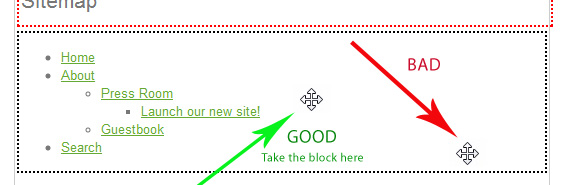
This behavior possibly depends on which browser you use, I don’t know, but taking block at the middle works in any browser perfectly. I mean modern browsers and not IE 6 🙂
Categories: concrete5 for dummies

I have searched around for a tip or solution for two block techniques I would like to accomplish. Hope maybe this has been addressed or. If not, that some of the erudite C5 gurus can get me up to speed:
1. Best way, if exists, to shrink height and width of the default block size. I would like to be able to insert an image at 320×240 and to have the block match that size or say, use a 5px margin. Is this a task for tables within the block?
2. I have noticed in two new C5 installations that there is no Global Scrapbook. Is this correct? Out of curiosity, I installed a third with sample content; this one did have a Global Scrapbook. I want to be able to use your posted technique for replacing text header with logo.
In a related issue with the alternate method, the header.php file in 5.4.0.5 doesn’t match the code you reference to change to the logo.
Thanks for your willingness to help.
Bob